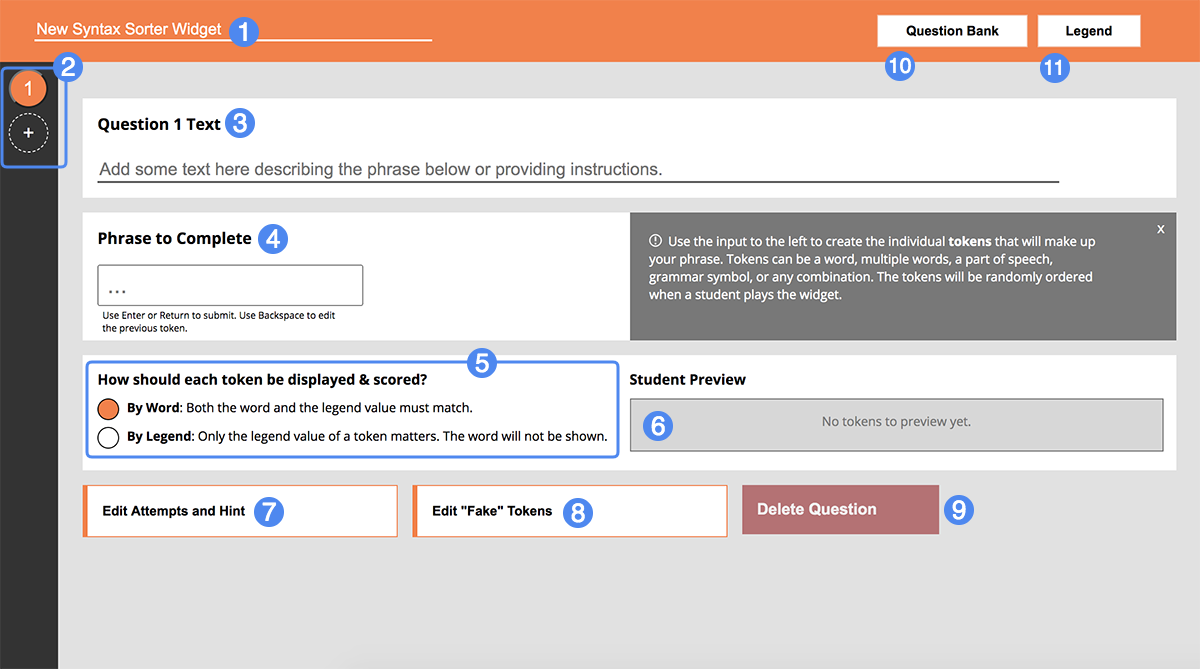
Syntax Sorter lets you create powerful syntax mastery tools by creating sentences or phrases, tokenizing them, and categorizing them based on a legend you create. Students are tasked with arranging the tokens in the proper order. You can choose to display tokens by both their word and legend value or simply the legend value each word represents.
Before creating individual phrases and tokenizing them, your first stop should be the Legend (11). It's the heart of the Syntax Sorter widget and allows you to define what each token represents.

Within the Legend, it's up to you to create the range of possible token categories. If you're teaching another language, for example, these categories may represent individual parts of speech: nouns, verbs, pronouns, and so on.
Each legend definition should be accompanied by a unique color. Students will use this color to identify the corresponding legend definition when they play your widget. Colors are randomly generated for each definition when you create it; you can select the color swatch to change it to a color of your choosing.

Use the Phrase Builder to construct your phrase for each question. Create a token by entering a word, multiple words, part of speech, grammar symbol, or any combination - then hit Enter or Return to tokenize your input.
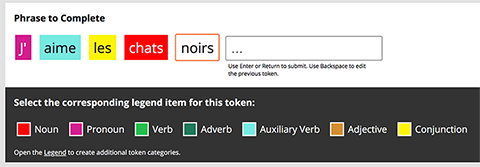
Once you've created a new token, select the token to display the legend selection drop-down, where you'll select what legend definition this token belongs to. Every token requires a corresponding legend type.
Use Backspace to convert previous tokens back into inputs, allowing you to edit or delete them.
Tokens are displayed to the student in one of two ways:
The Student Preview allows you to better understand how tokens will appear to the student when they play your widget:

In this example, the token display preference is By Legend. The word content is not shown; only the legend value of each token.

The Attempts and Hint dialog (7) allows you to set the number of submission attempts a student is granted for each question. By default, the attempt limit is 1. Students will be able to submit their arrangement up to this limit before being locked into that choice.
The optional hint is available for any question with an attempt limit higher than 1. If a student submits an arrangement that is incorrect, the hint is displayed alongside the question.

The "Fake" Token dialog (8) provides a way to increase the difficulty of a question by adding "fake" tokens to your phrase. These tokens will be added to the shuffled set of "real" tokens for the question. Students will be notified that not every token present may be part of the final phrase.
The "Fake" token builder works the same way as the actual phrase builder. Tokenize your input by pressing Enter or Return and then select the token to identify its corresponding legend value. Like the "real" tokens, all "fake" tokens must have an associated legend value.
Note that a fake token isn't automatically incorrect if used. If your display preference is By Legend and you have a "real" token of value "Noun" and a "fake" token of value "Noun", either token will be correct when placed in the correct position. Unlike before, however, you now have two "Noun" tokens instead of one.

The Question Bank dialog lets you limit the total number of questions a student must complete to a value lower than the total number of questions you've created in your widget. For example, if you have a widget with 8 total questions, but only want students to complete 5 in a given play of the widget, you can use this dialog to set that limit. When enabled, the questions are chosen randomly from the total set, meaning each time a student plays your widget, the set of provided questions will be different, and randomly arranged.
Unlike many other Materia widgets, students are prompted to check each of their answers prior to visiting the score screen, up to the limit set for each question. The entire arrangement must be correctly ordered for students to receive credit for a particular question. Keep this in mind when considering if you should build particularly long, complicated phrases that students must correctly arrange, or when providing too many additional "fake" tokens to confuse them.